Latest Post

Hello people, am guessing you are tired of your boot animation and you need something new or different. Well you're in the right place. Today we are going to teach you guys how to change your boot animation to anything you want


Lets Get Started!
You will need root access for this to work in your device
NOTE: IF YOU DON'T KNOW WHAT IS ROOT OR HOW TO GO ABOUT IT CLICK HERE


Now you are going to need an app called BOOT ANIMATIONS. You can download it from wherever you want but this is the premium version

CLICK HERE TO DOWNLOAD BOOT ANIMATIONS PREMIUM

STEP 1:Now open the boot animation app.
You will see a lot of boot animations. Tap on the one you want and click the plus sign.
It will ask you for root permission just click accept.
Now tap on backup and press install
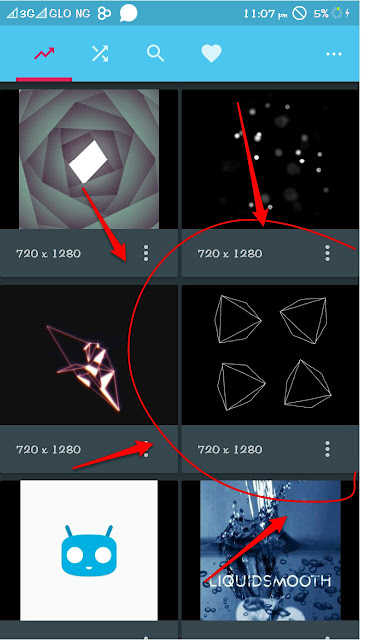
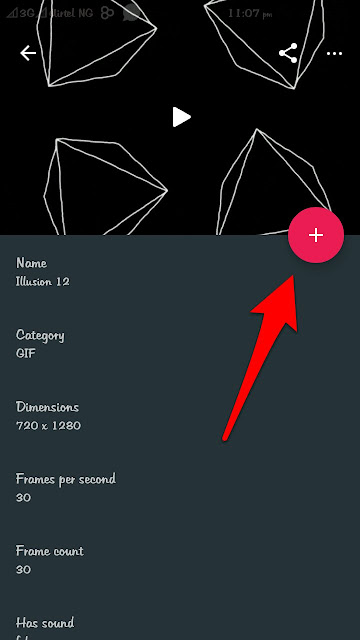
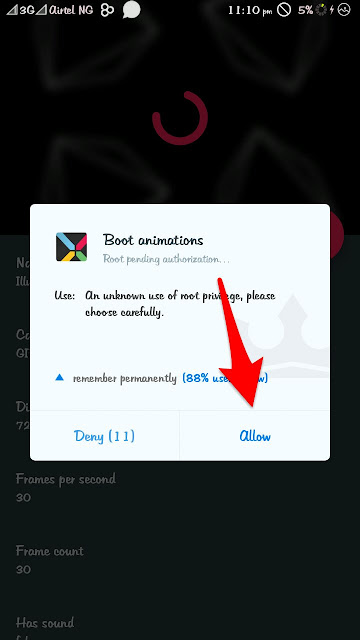
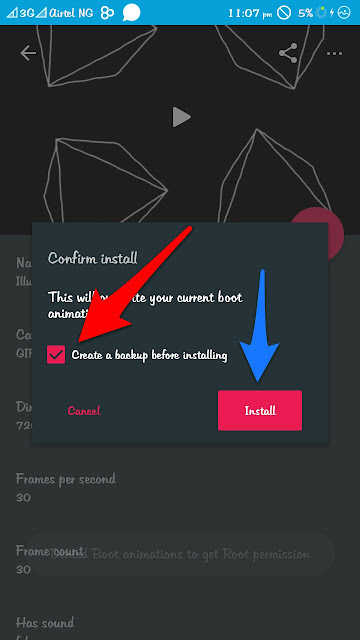


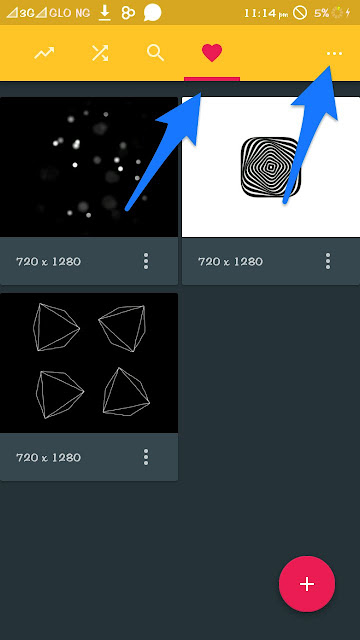
Now you go back and tap on the heart and you will see the downloaded boot image.

You can leave it like this if you want to and reboot but if you want it to show a different boot animation every time you restart your phone, continue reading!!


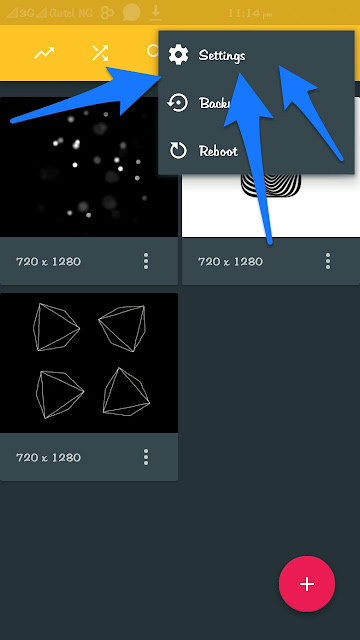
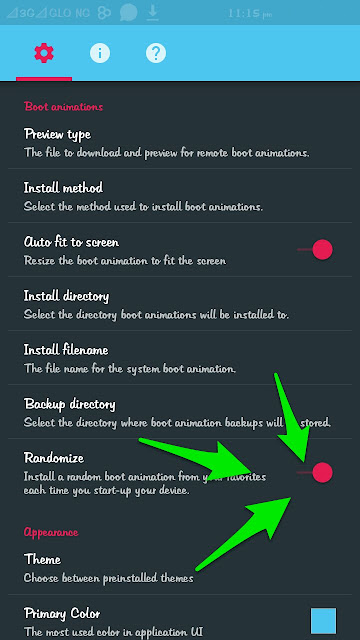
Now you tap on that button as shown in the picture and select settings and select Randomize! That's all


NOW IF YOU WANT IT TO SHOW YOUR NAME AS THE BOOT ANIMATION KEEP READING!!

Then you will need an app called LEGEND. You can download it from wherever you want but this is the premium version

CLICK HERE TO DOWNLOAD LEGEND PREMIUM

Now open the legend app
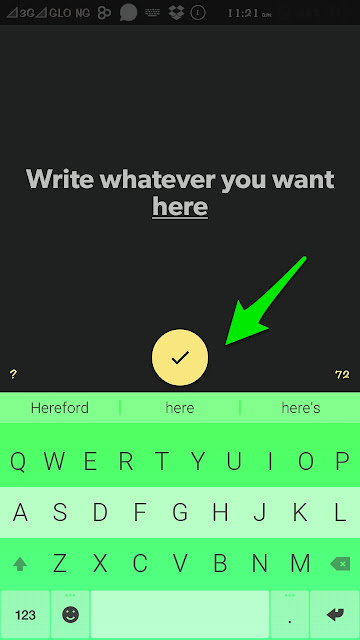


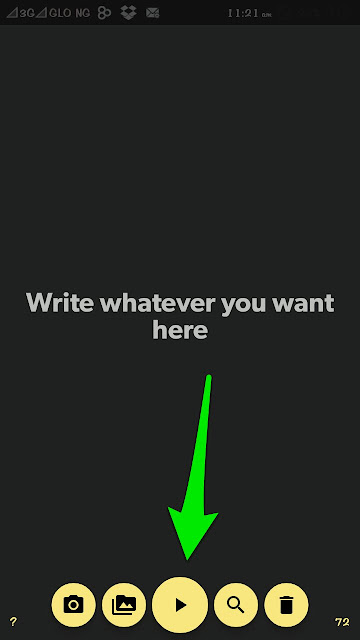
Write whatever you want and select the tick.
Then press play
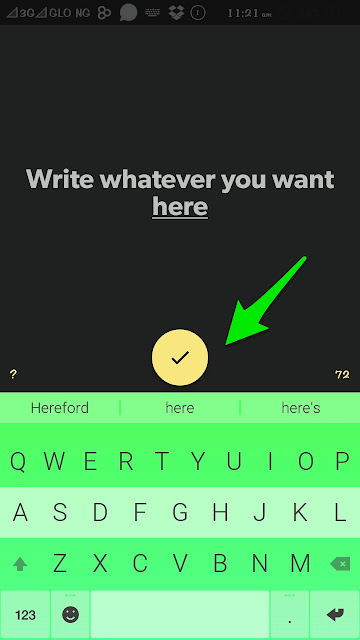


Select your desired style and color
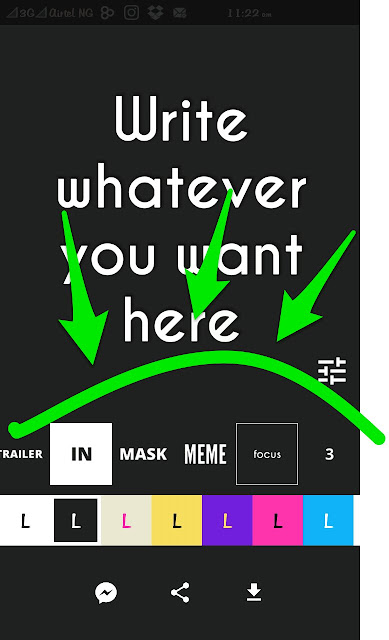


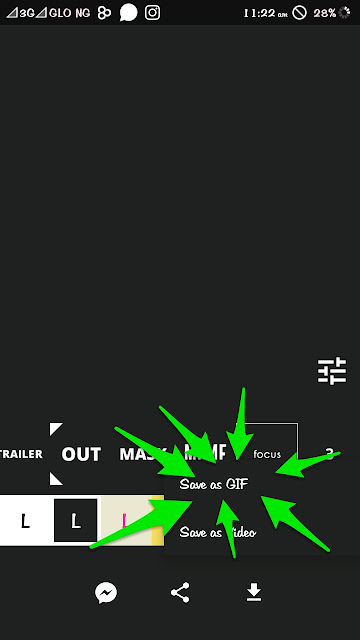
Now tap on the download arrow button and select save as GIF
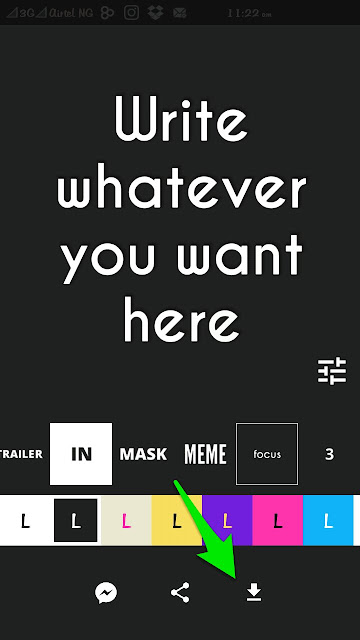


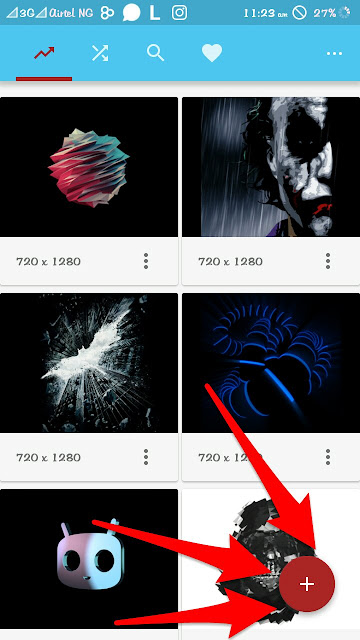
Once it's done go back to the boot animations app and tap on the plus sign below


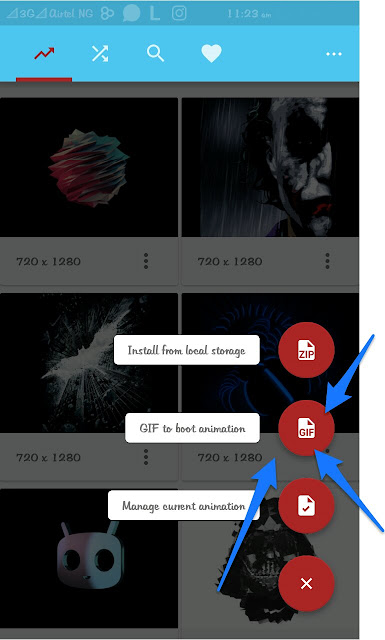
Now select GIF to boot animation


You will then see all your folders look for the legend folder and tap it
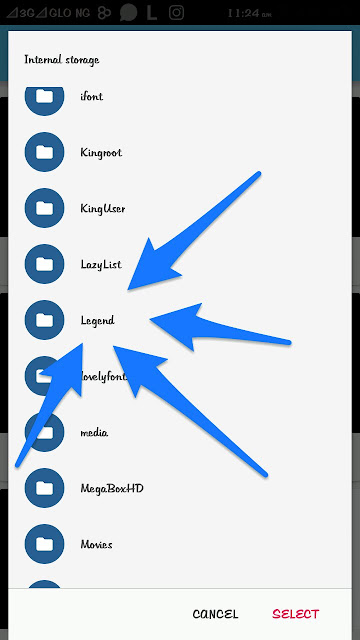


I have done some other Gif's before that's why mine is more than 1, yours should be just one

Now select that one and tap ok
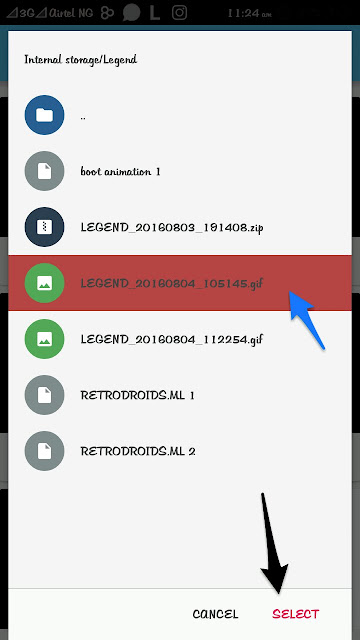


You will see a pop up. Just say ok and continue
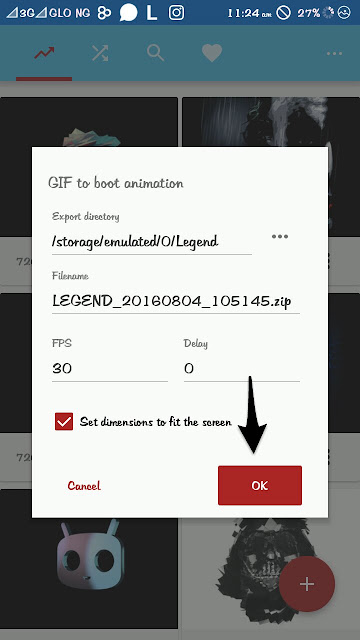


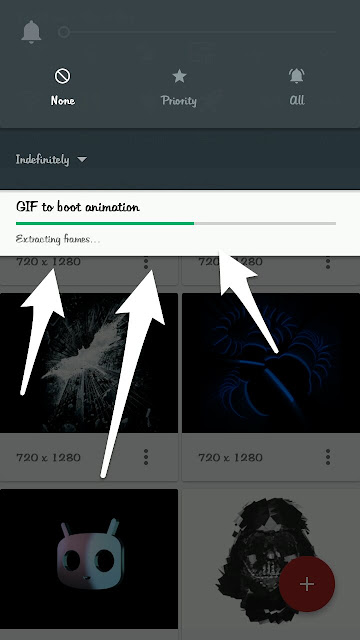
It will download and convert to animation.
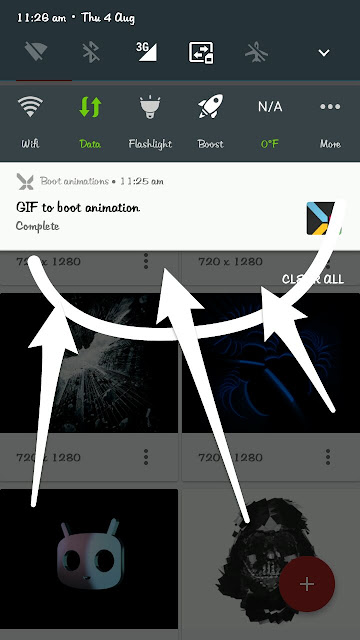


Once its done tap it and repeat STEP 1

THANK YOU FOR READING.. I HOPE YOU ENJOY THIS POST. IF YOU HAVE ANY PROBLEMS OR QUESTIONS OR OF IT WORKED FOR YOU. KINDLY COMMENT IN THE COMMENT SECTION BELOW.

Well i wrote a post on how to increase android ram and this is the part 2. Although there was a mistake in the link but it has been rectified. Kindly delete the old roehsoft ram expander and download it again from the same link.


Lets continue
So now you need Lucky Patcher to remove the "License check failed"
If you do not know what is lucky patcher or how to go about it click HERE

Now lets get started.
Open your Lucky Patcher. You are going to see a list of all your apps. Look for ROEHSOFT Ram Expander and tap it.


Select open menu of patches and tap remove License Verification


After that you will see a pop up select automode


You would see another popup. Just select what I selected and tap apply


Once it's done tap on Launch


Its going to ask you for root permission. Kindly accept.
(I used Kingroot to root my device if you used any other there is no problem. It will still work)

NOTE:THIS APP USES YOUR DATA BUNDLE. SO MOBILE DATA HAS TO BE ON FROM HERE

Now you select Optimal Value


Remember where you chose as swap file check. I selected my phone storage. So I'l click the first one which is my phone storage.


Then this will pop up


Just select okay.. You can select multi tasking, gaming or balanced. Depending on what you want
But I select balanced.


Then you will see this. Kindly wait for 1-2 minutes to allow it finish


Once that part is done. Another part will start

This is a very long tutorial.. Just have patience you will reap the fruit of your labour


Once its done select ok and you will see this. It depends on your phone sha. In my case i was given an extra 1gb ram. Making it sum up to 2gb.


NOTE: THIS IS JUST A VIRTUAL RAM. ITS NOT GOING TO BE SHOWN IN THE PHONE MEMORY BUT IT WORKS AS A NORMAL RAM WOULD ☺


Thanks for reading.
Your Comments are greatly appreciated. If you have any problems or questions regarding this. Kindly post it in the comment section below.

If you just saw this post and you didn't meet the part 1 click HERE

Well.. You are rooted but that's not enough. Some apps still need another gate way and that's the work of BusyBox.


There is not much to talk about busybox just download it and tap install.. It will ask for root permission. Just agree and continue

Just exist the app and go back to the app that needed the busybox it should work properly

Download BusyBox HERE


Hello people this is a very long topic but i am breaking it down into two


Lets Get Started!
To begin
You need some apps
1)Lucky Patcher.
2)Memory info - swap check.
3)Roehsoft Ram expander.

 NOTE:YOU NEED ROOT ACCESS. IF YOU DONT KNOW WHAT IS ROOT OR HOW TO ROOT CLICK  HERE

Open the memory info-swap check and tap on start ram expander here.


Then you select either your phone storage or your sd card.


Its better you choose phone storage.
Then if your phone is compatible its going to show this


If you tap get on market you will see that the app is meant to be paid for


But you can download it from the link.
After downloading it will show you this
Simply download busy box to get past that screen if you dont know what is busybox oe where to get it from click HERE When you download it.. It will show you this.
But if it doesn't, still wait for part 2 :)


This is where lucky patcher comes in

PART 2 WILL BE POSTED LATER ON. SO ALWAYS COME TO THE SITE ONCE IN A WHILE AND CHECK FOR PART 2.

Download Links
LUCKY PATCHER

MEMORY INFO SWAP FILE CHECK

ROEHSOFT RAM EXPANDER. 

 (corrected link)


RAM EXPANDER LINK 2

If you are having problems with the ram expnader. You can try the third one

RAM EXPANDER 3

Hello people. Throughout this week we have been talking about apps that will make your android better and enjoyable.

Well here is another app. Its called Megabox Hd
This is how the app looks like


This app allows you download any film you want even cartoons we used to watch in the days. This app is the best movie downloading app because of the speed and reliability. You get to choose if you want your video to be in 360p or 720p
No worries. The 720p is clearer than some movies' 1080p.. It uses the built in downloader to download the files

If you do not want your built in downloader to download the files you can select custom and choose the downloader you want. For me I use ADM (Android Download Manager)


Download Megabox HD here
Download Link 1

Download ADM here
Download Link 2

Hi guys, how has your day been so far. Well most of us use WhatsApp and are not satisfied with how it looks. The stock green and white sometimes is really boring and you cant explore other designs. Now with the help of the app known as Kmod you can easily and conveniently customise your whatsapp to your taste.


NB: TO USE KMOD YOU MUST ME ROOTED AND HAVE INSTALLED XPOSED

LEARN HOW TO ROOT HERE

INSTALL XPOSED HERE

Now that we are rooted and have installed xposed we can now learn about kmod and how to install it.

First download kmod here
Use xposed to apply the module and restart your phone.
Download kmod backgrounds from XDA SITE HERE

Transfer the downloaded kmod theme to the kmod background in your file manager


After transferring the theme open kmod and click on back up


Click load themes


Then you choose the theme you downloaded and apply it


NB: IF THE THEME YOU DOWNLOADED FROM XDA IS ZIPPED OR COMPREESED EXTRACT IT FIRST

Also drop your comments guys

Hello everyone. Today we are going to be talking about auto touch.


LETS GET STARTED!

What is Auto touch?

Auto touch as the name implies is an app that touches things automatically for you ☺.
Let's say i want to eat but i also want to like all the pictures of a person at once on Instagram.. Or i have a game that needs me to touch the screen multiple coins to earn my coins. Auto touch will do it for you.

How does it work?
How it works is that auto touch will record your touch input and replay it over and over again. This can also be done with Terminal Emulator or Air term but those methods are harder.

So Lets continue!

When you open the app you will see some functions below select the first one.


Then you go to the app that you want to use the auto touch for. Lets say it's Instagram.
Then I press the volume down button and this is what will pop up.


Then you select the Record button (your phone would vibrate to show that it has started) and start doing whatever you want.
For me I go to the explore feed or somebody's account and i start liking the pictures. When I'm done I press the volume down button and it shows recording finished.

I have to press the volume down button again to see the recorded file


Then I choose the file and i select how many times it would play and the interval


Then I press play


Then it does all the work for me.
NOTE: IF IT STOPS OR SHOWS RECORDING FINISHED. YOU HAVE TO GO BACK OPEN THE AUTO TOUCH APP AGAIN AND CLICK ON THE BUTTON AGAIN. THEN YOU GO BACK TO THE APP PRESS THE VOLUME DOWN BUTTON AND SELECT THE FILE ALREADY RECORDED

DOWNLOAD AUTO TOUCH HERE

Kindly drop your questions, suggestions and problems in the comment section below and I and my partner will gladly answer you.

Hello everyone! There are so many reasons you might want to download fifa 14, one of them might be because fifa 15 and fifa 16 use Internet and fifa 14 does not

Download FIFA 14

APK

DATA

Once they have been downloaded.. Extract the .rar file and put in the fifa 14 folder.


You can use ES File Explorer to extract
If you dont have ES File Explorer click Here

Download Link

Hello everyone. If you are here you might be thinking of what lucky patcher is and how you can use it. Let me start by saying what lucky patcher is.

Lucky patcher is an app that allows you hack games or applications with in-app-purchases. For example an app wants you to pay #100 for 10 coins. You can easily simulate the payment with this app and it will look as if you paid and you'll get your 10 coins. There are also other things you can use lucky patcher to do.


Lets get started

If you don't have lucky patcher download it here

DOWNLOAD LINK

NOTE: YOU NEED ROOT ACCESS FOR IT TO WORK. IF YOU DON'T KNOW WHAT IS ROOT OR HOW TO ROOT CLICK HERE

Lets continue!

Once you download this app you need to activate the xposed module first. Then reboot

IF YOU DONT KNOW WHAT IS XPOSED OR HOW TO USE IT CLICK HERE

Then you go to the app that you want to hack.
Go to the "buy coins" section or whatever they wrote
Click on whatever amount of coins you want
Lets say 200 coins is sold for 10 dollars.
I will click buy. Lucky patcher is going to pop up.
Select whatever you want to happen and click ok.
You are going to be given your coins.

Note this does not work on all applications and games.

THE VIDEO EXPLAINS IT BETTER!! 


Kindly drop your requests, complaints and questions in the comment section below.
Do have a lovely day

Author Name

Contact Form

Name

Email *

Message *

Powered by Blogger.